
The Birth of a Blog System: Python Blog Powered by Windsurf AI
I tried developing a blog system using Windsurf AI + Django and generated a fully functional system with homepage, detail page, category page, and admin panel in just 10 minutes. It was amazing. However, during optimization, I encountered issues with image uploads, UI adjustments, and dependency conflicts, mainly due to my limited experience with Python and Django. Despite the challenges, Windsurf AI performed excellently in standardizing features like OG and RSS.
 Recently, during Black Friday, I renewed some of my domain names, including one that I had almost given up on but had maintained for many years. I realized that SEO values differ for old and new domains, so I decided to continue and start blogging to build backlinks.
I initially considered using Typecho to create a simple blog, but after experimenting with Windsurf AI + Django a few days ago, which was smooth, I decided to try building a simple system with Windsurf + Python. This gave me better control over page optimization and security. I went straight to work.
From writing the first prompt to completing this article, it took about 1.5 days, with roughly 5 hours of actual development. The experience felt like a roller coaster.
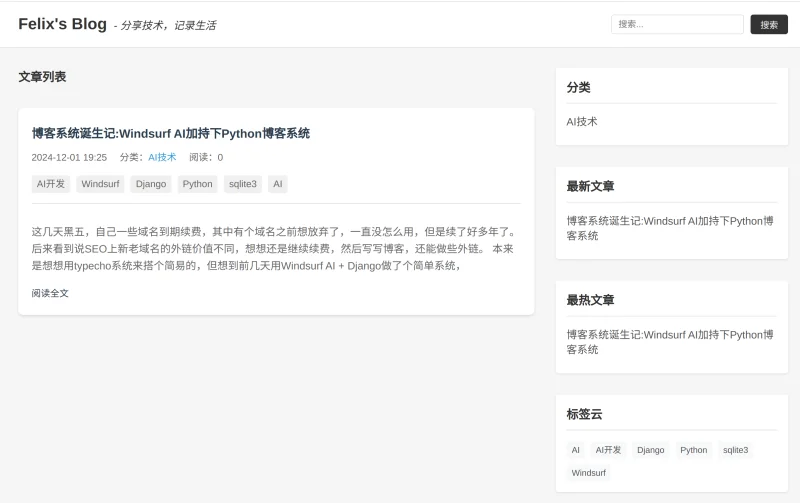
In the first 10 minutes, I had a version ready with homepage, detail page, category page, admin panel, and management for categories, articles, and tags. I was amazed—10 minutes after writing a prompt, Windsurf AI generated a working Python + Django + SQLite3 blog management system. I wanted to share screenshots immediately, but decided to refine it first and write an article.
The later process was more frustrating. Key challenges included: - After adding a markdown editor, image uploads worked but the editor appeared empty and could not save. - UI adjustments caused previously working elements to break. - Deploying on a VPS, some Python libraries differed from local versions, causing repeated dependency issues. Windsurf tried replacing components to help.
Looking back, it wasn't Windsurf AI's fault; it was my limited knowledge of Python and Django. Experienced developers could have handled these issues quickly. Windsurf AI, however, performed excellently in standard tasks like OG and RSS generation.
I originally wanted to document all prompts, but due to many issues, they aren't very useful. I included the initial 10-minute prompts and a relatively complete functional prompt below for reference.
Prompt 1:
Simple personal blog requirements
Technologies:
- Python + Django + SQLite
- Frontend: no third-party libraries, simple responsive layout
- Admin: Django admin
Pages:
- Homepage / Article list
- Article detail
- About page
- View by category
- View by tag
- Search

---------------
Prompt 2:
Adjust homepage/article list layout: left 70% article list, right 30% category, latest, hottest articles, tags.
---------------
Prompt 3:
Admin editor: support markdown editing, image upload, markdown preview, HTML editing, HTML preview

---------------
Prompt 4:
Add pagination to article list, previous/next articles at the bottom of detail page

---------------
Prompt 5:
Check admin backend for security vulnerabilities (e.g., access without login)

---------------
Prompt 6:
Generate 'F' favicon.ico (black on white) and matching SVG logo.

---------------
Prompt 7:
Optimize static files: compress CSS, JS, HTML during deployment

---------------
Prompt 8:
Instructions to deploy system on VPS with Nginx installed
Honestly, if colleagues at a company were to do this, it might take longer and the code quality may not match this. AI can save human resources and improve code quality significantly for companies or independent developers.
I will continue to optimize and improve this system using Windsurf AI.